
Your Guide to Business Recovery Planning
Think of business recovery planning as creating a “what-if” playbook for your company. It’s the system you’ll lean on to get back on your feet after a major disruption. This isn’t just some stuffy corporate exercise; for a small business, it’s a genuine survival tool for navigating the unexpected.
Why a Recovery Plan Is Your Business’s Best Insurance

Let’s be real for a minute. Nobody likes to dwell on worst-case scenarios. But what if your top supplier suddenly shuts down? Or your website crashes right in the middle of your biggest annual sale? What if a key team member walks out with zero notice? These aren’t just abstract worries; they’re the kinds of real-world problems that can bring a small business to its knees.
A solid recovery plan is your roadmap out of that chaos. It’s what allows you to respond with a clear head instead of reacting with pure panic when things go sideways.
The Real Price of Winging It
The first hit you’ll take during a disruption is always financial. Every hour you’re not operating is an hour of lost sales. But the damage runs much deeper than that. We’re talking about a bruised reputation, shattered customer trust, and a team that’s suddenly anxious and demoralized.
It’s shocking how many businesses fly without this safety net. Back in 2020, the majority of businesses worldwide admitted they had no continuity plan. That vulnerability was thrown into sharp relief during the pandemic, a period that saw many small businesses close their doors for good.
A great plan isn’t about preventing disasters—it’s about building the resilience to absorb the shock and bounce back stronger. It shifts your mindset from reactive panic to proactive problem-solving.
This forward-thinking approach means you can maintain some level of service, even during a crisis. That’s what keeps your customers loyal and your team feeling secure.
Shielding Your Operations and Assets
Your plan doesn’t have to be some massive, hundred-page binder that collects dust. At its heart, a good recovery plan is simply about answering a few critical questions before you’re in the hot seat.
- What are our absolute must-haves? Pinpoint the core functions that keep the lights on.
- Who does what when it hits the fan? Assign roles and responsibilities so there’s no confusion under pressure.
- How will we keep everyone in the loop? Figure out your communication strategy for both staff and customers.
Core Elements of a Practical Recovery Plan
Here’s a quick look at the fundamental pieces that make a recovery plan effective.
| Element | What It Involves | Why It Matters |
|---|---|---|
| Critical Function ID | Identifying the top 3-5 processes that generate revenue or serve customers. | You know exactly what to save first, preventing wasted effort. |
| Recovery Team | Assigning specific people to lead different parts of the recovery. | Eliminates confusion and ensures clear, decisive action under stress. |
| Communication Plan | Pre-written templates for emails and social media to update staff and customers. | Maintains trust and manages expectations when things are uncertain. |
| Data Backup & Recovery | Regular, automated backups of all critical data, stored off-site or in the cloud. | Protects your most valuable asset—your information—from being lost forever. |
Having these bases covered is what turns a document into a powerful tool.
Protecting your digital footprint is a huge piece of this puzzle. For any business with an online presence, knowing exactly how to backup your WordPress site is non-negotiable. It’s a simple, foundational step to ensure you can recover from a hack, crash, or server failure.
Ultimately, a straightforward, actionable plan is one of the smartest investments you can make for the long-term health of your business.
Pinpointing Your Most Critical Operations
Before you can even think about a recovery plan, you have to know what you’re actually protecting. This isn’t about corporate-speak or complex analysis; it’s about getting real about the absolute must-haves that keep your business running day in and day out.
Let’s put it this way: if a local coffee shop’s POS system crashes, sales grind to a halt. If a freelance graphic designer’s primary computer dies, they’re dead in the water until it’s fixed. Every business has these pressure points, and your first job is to find yours.
The process is pretty straightforward: figure out what’s critical, decide how fast you need it back, and then line up the resources to make it happen.
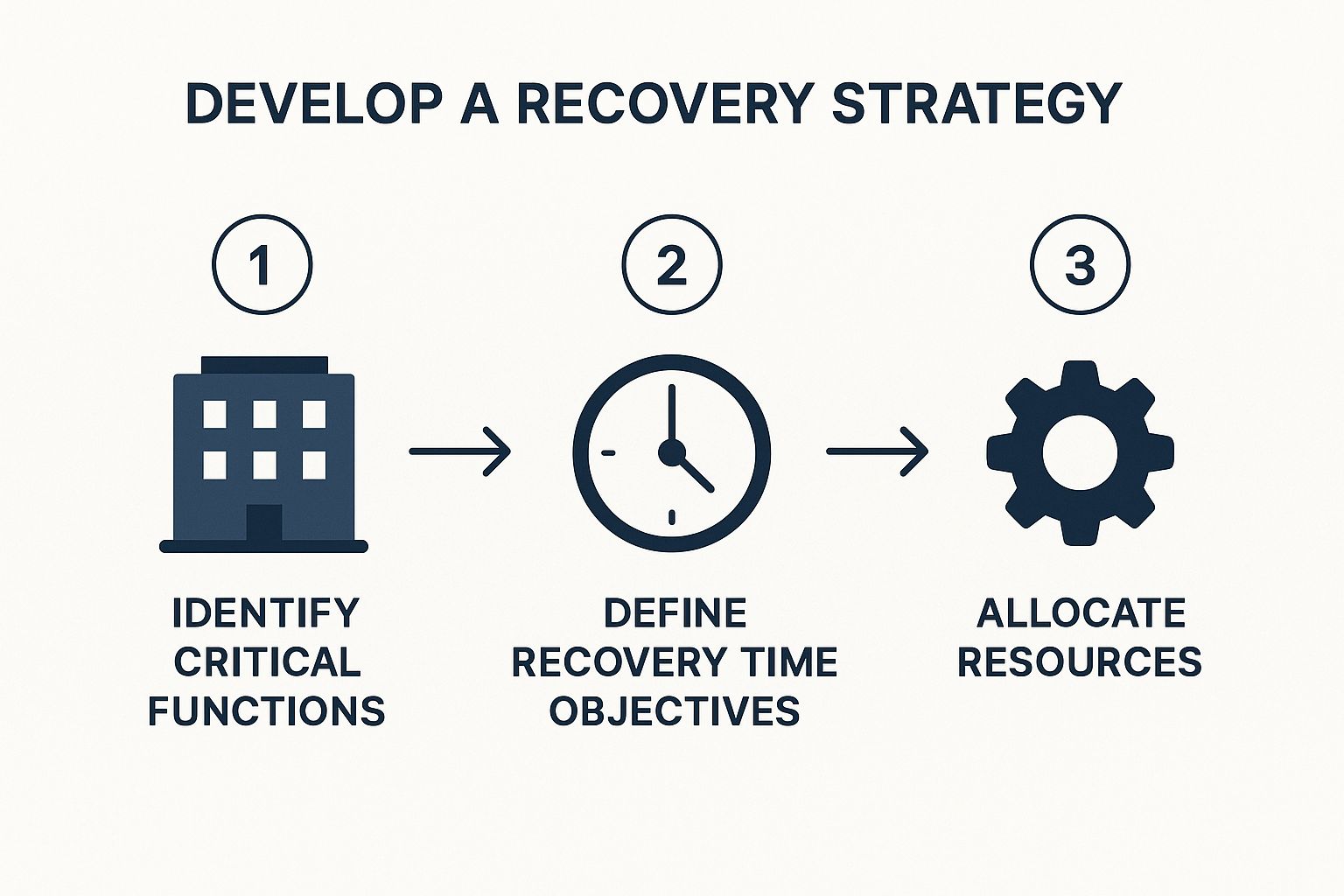
As you can see, a solid plan isn’t random. It’s built on a logical foundation that moves from identifying what matters most to figuring out how to keep it safe.
Identifying Your Core Business Functions
Start by just making a big list of everything your business does. Seriously, every single activity. Now, for each one, ask a simple question: “If this broke for a day, how bad would it be?” This gut-check is your own quick-and-dirty version of a business impact analysis.
The idea here is to sort everything into three simple buckets:
- Mission-Critical: These are the showstoppers. If they fail, you immediately stop making money or serving customers. Think of your online store’s checkout page, the main machine on your production line, or the software you use to book appointments.
- Essential: These are important, but their failure isn’t an immediate catastrophe. Things like your internal accounting software, marketing automation tools, or your project management system probably fall into this category.
- Non-Essential: These are the “nice-to-haves” that can be put on the back burner. This could be an internal training portal or that long-term R&D project you’re tinkering with.
Once you have this list, you’ve basically created your emergency roadmap. When disaster strikes, you won’t waste a second trying to fix something non-essential. You’ll know exactly where to focus first, and that clarity is everything.
A business impact analysis isn’t about creating some perfect, massive document. It’s about knowing your priorities so you can make smart, fast decisions when you’re under the gun.
Don’t underestimate how important this is. The stats are pretty grim: a staggering 40% of businesses that get hit with a major disaster never manage to reopen. On top of that, 70% of companies that don’t have a tested plan report that disruptions last way longer than they should.
Mapping Dependencies and Weak Spots
Okay, so you know what’s critical. The next step is to figure out what (and who) keeps those critical functions running. What people, software, or suppliers does each one rely on? A marketing agency’s most critical function might be “delivering client campaigns,” but that one thing depends on a specific project manager, a cloud storage service like Dropbox, and their social media scheduling tool.
I find it helps to create a simple chart for each mission-critical function. It doesn’t have to be fancy.
| Critical Function | Key People | Technology | Suppliers/Partners |
|---|---|---|---|
| Online Sales | E-commerce Manager | Website Host, Payment Gateway | Shipping Carrier |
| Client Service | Support Team Lead | CRM Software, Phone System | Internet Provider |
| Product Assembly | Lead Technician | Assembly Line Machine | Raw Material Vendor |
Laying it out like this instantly shows you where your weak spots are. What happens if your lead technician is the only one who knows how to fix that key machine? What’s the plan if your go-to shipping company suddenly goes on strike? Thinking through these “what-ifs” now is what separates a coordinated response from a complete panic.
Assembling Your Crisis Response Team
Let’s be honest. When things go sideways, you’re not going to be flipping through a dusty binder. You’re going to be looking to your people. A great business recovery plan is only as good as the team you’ve got to execute it, which is why this human element is so incredibly important.
Don’t get caught up in creating a massive, formal committee. For most small businesses, that’s just overkill. What you really need is a small, dedicated crew where everyone knows their job. The goal is to assign clear, simple roles so that when a crisis hits, there’s no confusion.
Without defined roles, you get chaos. People either freeze up or everyone tries to do everything at once. But with them? You get a coordinated, confident response.
Defining Key Roles and Responsibilities
Before anything ever happens, you need to decide who wears which hat. Your team might just be a few people, but each role is crucial. Think about the main functions you’d need to cover in an emergency, then assign a primary and a backup person for each.
Your core team should cover at least these three bases:
- The Leader (or Point Person): This isn’t automatically the owner. It’s the person who stays level-headed under pressure, makes the final calls, and basically directs the whole recovery effort. They become the central hub for information.
- The Communications Lead: This person owns all messaging, both internal and external. They’re in charge of keeping your employees, customers, and key partners in the loop with clear, consistent updates. Think social media posts, client emails, and staff briefings.
- The Operations/Technical Lead: This is your hands-on problem-solver. Their job is to fix what’s broken—getting systems back online, calling vendors to repair equipment, or even finding a temporary workspace if your office is out of commission.
Having a designated backup for each role is absolutely non-negotiable. What happens if your main tech person is on vacation when your server crashes? A simple list of who’s next in line prevents a single point of failure from derailing your entire recovery.
Building Your Communication Tree
One of the fastest ways for a crisis to spiral out of control is through a communication breakdown. Rumors start flying, employees get anxious, and customers feel like you’ve abandoned them. A simple communication tree stops this before it starts by creating a clear, reliable flow of information.
This doesn’t have to be some complex flowchart. It really just comes down to answering two questions:
- Who needs to know what?
- How are we going to tell them?
For example, your Communications Lead might be responsible for sending a pre-written email to all clients within one hour of a major service outage. At the same time, the Team Leader might be in charge of sending a group text to all staff with an initial update.
By mapping out these communication paths ahead of time, you make sure the right people get the right information from the right person. This small bit of planning can turn potential panic into managed patience, which is a huge part of successful business recovery planning. Keeping everyone calm and informed is often half the battle.
Creating a Plan You Can Actually Use
Look, a 50-page business recovery plan gathering dust in a binder is completely useless. The real goal is to create a living, breathing document that’s simple, easy to find, and actionable—especially when your team is stressed out and the power is off.
Forget the massive, corporate-style manual. Think more like a collection of clear, concise playbooks. The best plans I’ve ever seen rely on simple checklists, straightforward contact trees, and step-by-step guides that anyone, even the new hire, can pick up and immediately understand. In a crisis, simplicity is your best friend.
Designing for Real-World Scenarios
Your plan has to exist outside your main office. Seriously. If a burst pipe floods the server room, that beautifully crafted plan saved only on your local network is just a cruel joke. You need to have it available in multiple formats and locations.
- Cloud Storage: Keep the latest version in a shared cloud drive like Google Drive or Dropbox. Make sure key team members have access from their personal devices, not just their work computers.
- Physical Copies: It might feel a bit old-school, but keep a few printed copies in a secure, off-site spot. When the internet goes down, you’ll be glad you did.
- Mobile Access: Is your plan a clunky PDF that’s impossible to read on a phone? Fix that. During an actual emergency, a smartphone might be the only tool your team has.
Here’s the ultimate test: Can an employee who has never seen the plan before, in the middle of a chaotic situation, open it up and know exactly what to do? If the answer is no, it’s too complicated. It will fail.
If you’re staring at a blank page, grabbing a practical emergency response plan template can give you a solid foundation. These often provide the basic structure, so you can focus on filling it in with what matters for your business.
Stress-Test Your Business Recovery Plan Before You Need It
Writing the plan is only half the job. A plan full of holes you don’t know about is just as dangerous as having no plan at all. You have to “stress-test” your strategies to find the weak spots before a real crisis finds them for you. And no, this doesn’t have to disrupt your daily operations.
Start with something simple and informal.
Tabletop Exercises
These are basically guided “what if” discussions. Get your crisis team in a room, throw a hypothetical scenario at them, and see what happens.
- Scenario Example: “Okay, team. Our main payment processor just went down nationwide. We can’t take any credit cards, and it’s the first day of our big annual sale. What’s our first move? Who’s in charge of telling customers?”
A simple conversation like this can uncover huge gaps in minutes. You might suddenly realize that no one is officially responsible for updating the website, or that you don’t actually have a backup payment method ready to go.
Practical Drills
Once you’ve talked it through, it’s time to move from talking to doing. These are small, hands-on tests of specific parts of your plan.
- Drill Example: Once a quarter, ask your IT person to restore a random, non-critical file from your backup system. This sounds basic, but it proves your data isn’t just backed up but is also recoverable. It’s a critical distinction many businesses tragically overlook until it’s too late.
If you’re building from the ground up and want a solid framework, a good business continuity plan template can save you a ton of time. It helps make sure you don’t miss the important stuff as you build out your playbooks. By testing these pieces regularly, you turn a document on a shelf into a reliable, real-world capability.
Keeping Your Business Recovery Plan Relevant

It’s tempting to create a business recovery plan, file it away, and feel like you’ve checked a box. But here’s the thing: a recovery plan isn’t a one-and-done document. Your business is constantly changing—you hire new people, adopt new tech, switch suppliers. If your plan doesn’t grow with you, it’s pretty much useless.
What we’re talking about here is turning disaster planning from a dreaded project into a simple, ongoing business habit. It’s about creating a culture where thinking about “what if” is just part of how you operate. That way, your plan is always ready to go.
Establishing a Simple Review Schedule
Look, you don’t need to block off a whole week every year for this. The trick is to tie your plan reviews to things that are already happening in your business. This makes it a natural part of your workflow and ensures the plan actually reflects reality.
I tell my clients to think of these events as built-in reminders to dust off the plan:
- Technology Changes: Just switched to a new CRM or moved your files to a different cloud provider? That’s a trigger. Every new piece of software or hardware introduces new potential failure points that have to be accounted for in your plan.
- Key Personnel Shifts: When a team leader leaves or you bring someone new on board, that’s your cue. Review their role in the recovery process. You want to make sure your new manager knows exactly what’s expected of them before a crisis hits, not during.
- Supplier or Partner Updates: Changed your main shipping company, a key materials vendor, or even your internet provider? Your recovery checklists need updating. There’s nothing worse than trying to contact a critical partner during an emergency only to find the number is for a company you stopped working with six months ago.
Even with these event-based check-ins, I still recommend a quick annual review. Just get your crisis team together for an hour. Read through the plan and ask one simple question: “Does this still make sense for our business today?”
Think of your recovery plan like a muscle. If you don’t use it and work on it regularly, it becomes weak and ineffective when you suddenly need it to perform.
Learning from Every Hiccup
Not every disruption is a full-blown disaster. In fact, the small stuff—a website that goes down for an hour, a supplier delay, a key employee calling in sick for a week—is a gift. These are low-stakes fire drills that show you exactly where the cracks are.
After any minor hiccup, huddle with your team and ask a few simple questions:
- What part of our response went smoothly?
- Where did we get stuck or waste time?
- What’s one thing we could change in our plan to make this easier next time?
Folding these little real-world lessons into your document is what turns a generic template into your plan. This approach to business recovery planning makes it a living tool that gets stronger over time. You’re not just reacting to problems; you’re building a truly resilient culture that can handle whatever comes its way.
Got Questions About Business Recovery Planning?
Even with the best guide, creating your first business recovery plan can feel a little daunting. That’s totally normal. Let’s walk through some of the questions I hear most often from small business owners. Getting clear on these points will help you build a plan you can actually rely on.
What’s the Difference Between a Recovery Plan and a Continuity Plan?
This is a great question, and it’s easy to see why people get them mixed up. They sound similar, but they tackle different parts of a crisis.
Think of Business Continuity as your “keep the lights on” strategy. It’s all about maintaining your absolute essential services during a disaster. It’s the immediate, in-the-moment plan to prevent a total shutdown.
A Business Recovery plan kicks in after the initial chaos has subsided. This is your detailed roadmap for getting everything back to 100%. It’s the structured process of rebuilding, restoring data, and getting your team fully operational again. Your recovery plan is a vital part of your overall continuity strategy.
I’m a Solopreneur. Do I Really Need One?
Yes, absolutely. In fact, you might need one more than anyone else. When you are the business, there’s no one to pick up the slack if something happens to you or your key equipment.
Your plan will obviously look different from a 10-person company’s, but it’s no less crucial. You’ll want to focus on your unique vulnerabilities:
- Your Data and Passwords: Are your critical files backing up automatically? Does a trusted person (like a spouse or lawyer) know how to access essential accounts in an emergency?
- Your Network: Who can you call for help? Keep a list of fellow freelancers or contractors who could potentially step in to manage client communication or finish a critical project if you’re out of action.
- Your Finances: How long could you realistically last with zero income? Your plan should outline how big your emergency fund is and exactly when you’d need to start using it.
For a one-person show, this isn’t about managing a team; it’s about protecting your livelihood.
A recovery plan ensures a personal crisis doesn’t automatically mean a business-ending one. It’s your safety net.
How Often Should I Test My Plan?
A plan that just sits in a drawer is pretty much useless. You have to actually test it to see if it works before you’re in the middle of a real emergency.
I recommend running a simple “tabletop” test at least once a year. This is just an informal walkthrough where you and any key people talk through a hypothetical scenario. “Okay, our main supplier just went bust. What’s the first thing we do according to the plan?”
Beyond that, try to do a practical drill annually. This could be as simple as actually restoring a few files from your backup system. It’s a small step that proves your backups are actually working and accessible.
And remember, any time your business goes through a major change—you move offices, switch to a new CRM, or bring on a key team member—it’s time to pull out the plan and give it a quick review.
At Business Like NZ Ltd, we help small to medium businesses in Auckland move beyond just planning and into true financial freedom. We offer the business advisory services you need to build a resilient and thriving company. Find out how we can help your business prepare for anything at https://businesslike.sproutonline.nz/.